
Medicare Lead Follow-Up System: The 5-Minute Rule That Books More Appointments
Most agents lose Medicare leads before they ever dial. Not because the lead was bad. Because the follow-up was too slow. A Medicare lead follow-up system is not a nice-to-have. It is the difference between a $35 lead that books an appointment and one that goes cold in your inbox.
Why Your Medicare Lead Follow-Up System Decides More Than Your Ad Budget
You can spend $35 on a perfect lead. Quiz-qualified. SMS-verified. Exclusive to you. And still lose it.
Research shows that 78% of customers buy from the first agent to reach them. Not the best agent. The first one. In Medicare sales, where the same prospect may be searching across multiple sources, response speed is a competitive weapon.
Most agents average over 29 hours before following up. That gap is where your cost per appointment doubles.
The 5-Minute Speed-to-Lead Window
Studies on Medicare lead response time show that agents who contact a lead within 5 minutes are 21 times more likely to qualify it than those who wait 30 minutes. The window does not just shrink. It closes.
At a 22% lead-to-book rate, a $35 CPL gets you one booked appointment for roughly $159. If slow follow-up cuts your contact rate in half, that same appointment now costs $350. Same lead. Same ad spend. Very different math.
What a Medicare Lead Follow-Up System Actually Looks Like
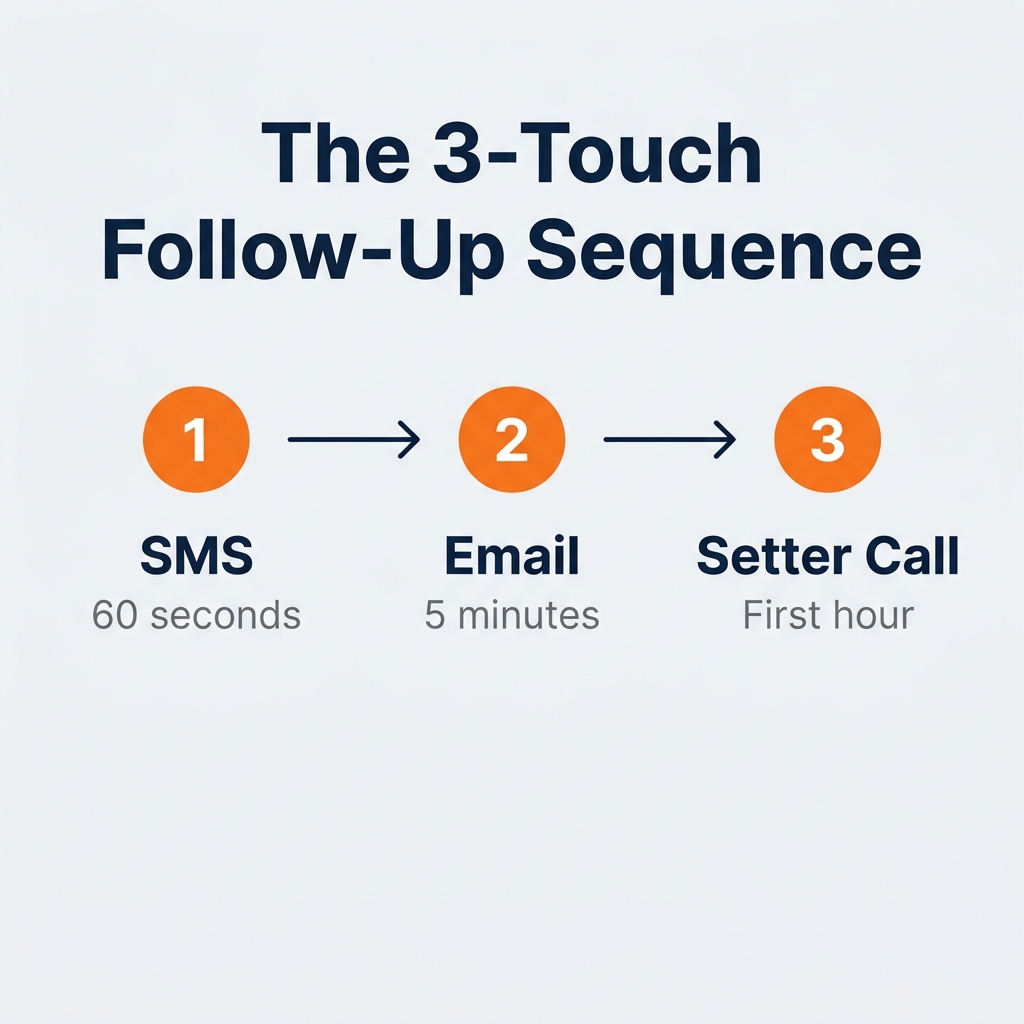
A Medicare lead follow-up system is a three-part sequence that fires the moment a lead submits their information. Not when someone notices it. Not at the end of the day. Immediately and automatically.
Step 1 — Automated SMS Within 60 Seconds
The first touchpoint is a text. It goes out automatically the moment the lead is created in your CRM. It is not a pitch. It is a short, warm message that confirms the prospect is in the right place and sets up the call.
Example: "Hey [First Name], this is Dylan with SixtyFiveLeads. I saw you were looking into your Medicare options. I'll give you a quick call in just a few minutes. Talk soon."
This text does three things: it confirms the phone number is active, it sets the expectation of a call, and it gives the prospect a name to look for on their caller ID.
Step 2 — Follow-Up Email Within 5 Minutes
While the SMS fires, a short email goes out in parallel. It does not need to be long. Name what they asked about, confirm the next step, and include a booking link in case they want to get ahead of the call.
This creates a second touchpoint before the setter ever picks up the phone. Multi-channel follow-up consistently outperforms single-channel contact.
Step 3 — Setter Call Within the First Hour
The setter calls the lead within the first hour. By this point, the prospect has already received two messages. They know your name. They know the call is coming. The setter is not cold-calling a stranger. They are following up on a warm, expected conversation.
That context alone improves contact rate and sets the tone for the booking conversation.
How to Build This Medicare Lead Follow-Up System in GHL
GoHighLevel is built for exactly this workflow. The automation triggers the moment a new contact is created — whether from a Meta Lead Ad, a quiz funnel submission, or a landing page opt-in.
The Workflow Trigger and First Actions
In GHL, create a workflow with a "Contact Created" trigger. First action: send an SMS immediately. Second action: send an email with a 2-minute delay so it feels human. Third action: assign the contact to your setter with a task notification and alert.
This entire sequence can be live in under an hour. If you have not set up GHL workflows yet, start with our GHL setup guide for Medicare agents — it walks through building your first workflow from scratch.
The Appointment Confirmation Sequence
Once an appointment is booked, a second automation handles show rate. Reminders go out automatically 24 hours and 1 hour before the call. Research shows automated appointment reminders can reduce no-show rates by up to 40%.
Our target show rate is 75%. That number assumes a confirmation sequence is running. Without it, 75% is hard to hit consistently.
The Follow-Up Sequence: Days 1 Through 7
Not every lead books on the first call. A complete Medicare lead follow-up system keeps working after the initial three-touch sequence.
The recommended cadence after first contact:
- Day 1: SMS + email (immediate) + setter call
- Day 2: Short follow-up text with a booking link
- Day 4: Email with a useful resource (enrollment window info, plan overview, etc.)
- Day 7: Final low-pressure text — leaves the door open
Seven days. Four to five touchpoints. After Day 7, the lead moves to a long-term nurture list and gets re-engaged at the next enrollment window.
Most agents stop after one or two attempts. Most conversions happen on touchpoints three, four, or five. The agents who automate the full 7-day sequence are the ones who see their lead-to-book rate actually hit 22%.
What Breaks Most Medicare Lead Follow-Up Systems
The most common failure is manual dependency. The agent or setter has to remember to call. The CRM has leads but no workflow built. The SMS template was written but never triggered.
A Medicare lead follow-up system only works when it is fully automated. Every step from first text to appointment confirmation should require zero manual action to start. The setter's job is to close the loop on the call — not to remember which leads need follow-up today.
The second failure is leaving out a booking link. Every message in the sequence should include a direct way to book. Some leads will schedule themselves without ever speaking to a setter — but only if you give them the option at the right moment.
Build the System Before You Scale the Leads
If your follow-up system is slow or manual, more leads will not fix the problem. They will make it more expensive.
A $35 lead with a 5-minute response and a 22% book rate costs $159 per booked appointment. The same $35 lead with a 2-day response and a 10% book rate costs $350. Same lead cost. The Medicare lead follow-up system is what separates those two outcomes.
Build the system first. Then scale the lead volume.
Wondering whether your current pipeline is set up to convert the leads you are already paying for?
Take the free 60-second assessment and get your personalized Medicare Lead Gen Roadmap. It shows exactly where leads are leaking in your pipeline and what to fix first.
Get Your Free Medicare Lead Gen Roadmap
Or if you are ready to talk now, book a free 20-minute strategy call here. No pitch. Just a look at your system and what faster follow-up could mean for your appointments.
Frequently Asked Questions About Medicare Lead Follow-Up Systems
Q: What is the best Medicare lead follow-up system for independent agents? A: The most effective Medicare lead follow-up system combines an automated SMS within 60 seconds, a follow-up email within 5 minutes, and a setter call within the first hour — all triggered automatically the moment a lead submits their information. GoHighLevel handles this workflow natively with a contact-created trigger and multi-step automation.
Q: How fast should you follow up on a Medicare lead? A: Within 5 minutes. Research shows agents who respond within 5 minutes are 21 times more likely to qualify a lead than those who wait 30 minutes. An automated SMS firing within 60 seconds keeps you first in line without requiring any manual action.
Q: How many times should you follow up on a Medicare lead? A: A complete Medicare lead follow-up system runs 4 to 5 touchpoints over 7 days. Most agents stop after 1 or 2 attempts, but most conversions happen on touchpoints 3, 4, or 5. After Day 7, move the lead to a long-term nurture list for re-engagement at the next enrollment window.
Q: Does automated follow-up improve Medicare appointment show rates? A: Yes. Automated appointment reminders sent 24 hours and 1 hour before the call can reduce no-show rates by up to 40%. Our target show rate is 75%, and hitting that benchmark consistently requires a confirmation sequence running automatically in the background.